PDM Studio - Integration with AutoCAD CAD

PDM Studio Integration with AutoCAD CAD

AutoCAD is one of the most widely used CAD systems worldwide, particularly in 2D CAD. In many companies, AutoCAD and DWG data coexist alongside designs created in Design Center Solid Edge, Design Center (NX), SOLIDWORKS, CREO or Inventor.

PDM Studio creates a central database for such heterogeneous CAD environments and enables end-to-end management of product data across different CAD systems.

You benefit from PDM Studio's seamless integration with AutoCAD and guaranteed data compatibility when making CAD changes. PDM Studio functions can be accessed directly from within AutoCAD. There's no need to switch between applications, which saves time and allows you to stay focused on your daily work.

Full integration with AutoCAD CAD

PDM Studio Integration in AutoCAD CAD

PDM Studio is fully integrated into the AutoCAD user interface as an add-in. From here, you can perform key functions without having to switch to PDM Studio. These include checking documents in and out, starting workflows, and other options. With a single click, you can also access all information about the component currently open in AutoCAD within PDM Studio.

An Overview of Selected Features in AutoCAD

The Highlight: The Automation Designer
PDM Studio Automation Designer für AutoCAD CAD

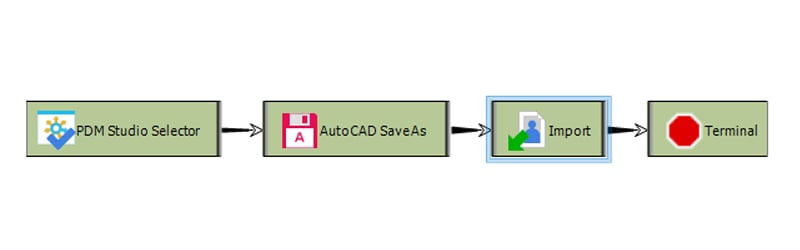
Recurring routine tasks, such as creating drawings or neutral formats, aren’t just tedious—they also take up a lot of time that could be put to much more effective use. With PDM Studio Automation Designer, that’s a thing of the past. Without any programming at all, you can simply use “drag & drop” to create your own workflows, which are then triggered either manually with a click or automatically via customizable triggers.

Transparent Life Cycle
PDM Studio Revisionshistory für AutoCAD CAD

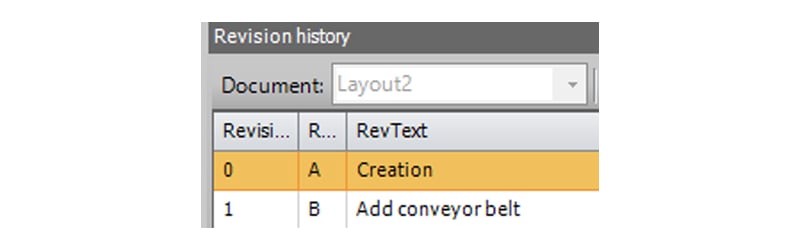
A document's lifecycle always shows who did what and when, providing a quick overview. This eliminates the need for lengthy searches for the right document, allowing users to devote that time to actual project work.

Where Used List
PDM Studio Verwendungsnachweis für AutoCAD CAD

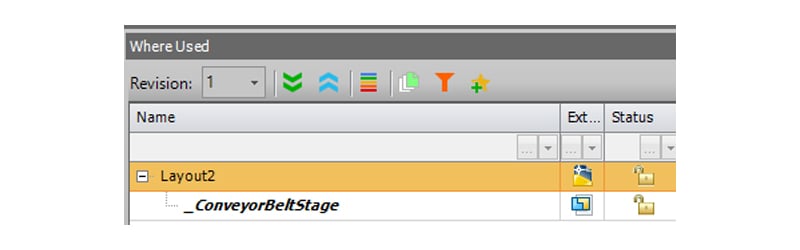
The where-used list immediately shows the user where a document is referenced, without the need for time-consuming research. This makes it clear, among other things, what consequences adjusting a component, for example, might have.

A Quick Overview Thanks to Links
PDM Studio Verknüpfungen für AutoCAD CAD

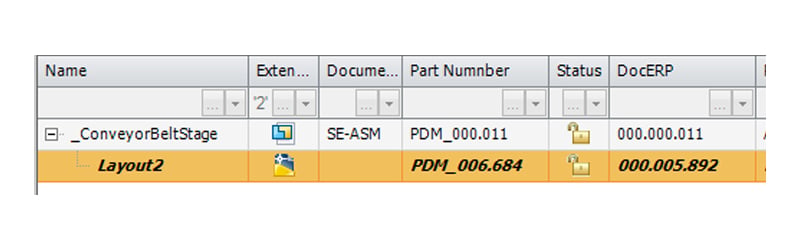
By linking documents to one another, users can quickly get an overview of related documents or of all the documents used in a project.

Consistent DWG Properties
PDM Studio DWG-Eigenschaften für AutoCAD CAD

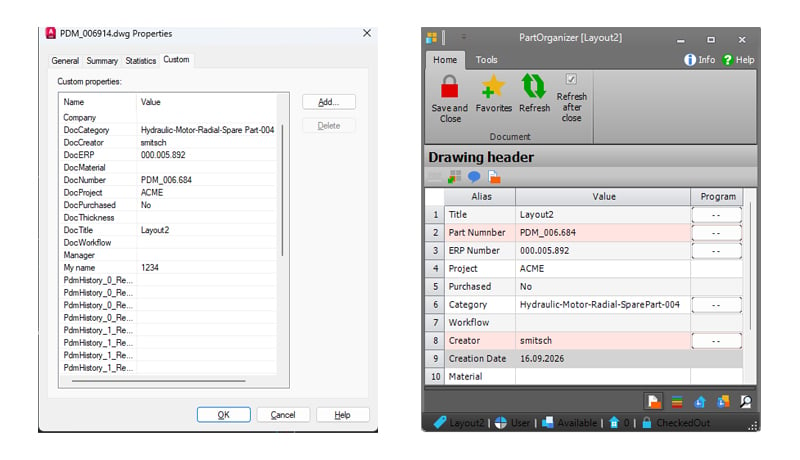
All information created in PDM Studio can be accessed via the DWG properties and is available for use in the drawing, such as in the title block. The information is entered only once. This saves time and prevents errors.

PDM Studio can usually be integrated and implemented within a few weeks. It is not necessary to prepare all the data in advance.

Asset data is imported 1:1 from another PDM system or folder structure and is optimized only during the editing process. It doesn't get any faster or easier than that!

Interested in PDM Studio? Send us a message:

CAD Partner GmbH

Am Marktplatz 7
93152 Nittendorf
Germany

Tel.: +49 9404 9639-21
E-mail: info@cadpartner.de


Smap3D GmbH

Am Marktplatz 7
93152 Nittendorf
Germany

Tel.: +49 9404 9639-10
E-mail: info@smap3d.com


Smap3D, LLC

260 Arbor Springs N Dr.
Newnan, GA30265
USA

Tel.: +1 408 484 6404
E-mail: info@smap3d.com