PDM Studio Integration with Inventor CAD
Autodesk Inventor is a CAD software developed by Autodesk for mechanical 3D modeling, simulation, visualization, and documentation. For data management, Autodesk recommends its own solution, Vault. PDM Studio is a suitable alternative to this system and offers numerous additional benefits.
Some functions that can be started directly from Inventor include:
- Switch directly to PDM Studio
- Save in PDM Studio
- Check out documents for editing
- Create copies, e.g. including linked drawings
- Approve and change status
- Create a revision/version
- Open the drawing associated with a 3D model directly
All information provided by Inventor is also mapped in PDM Studio:
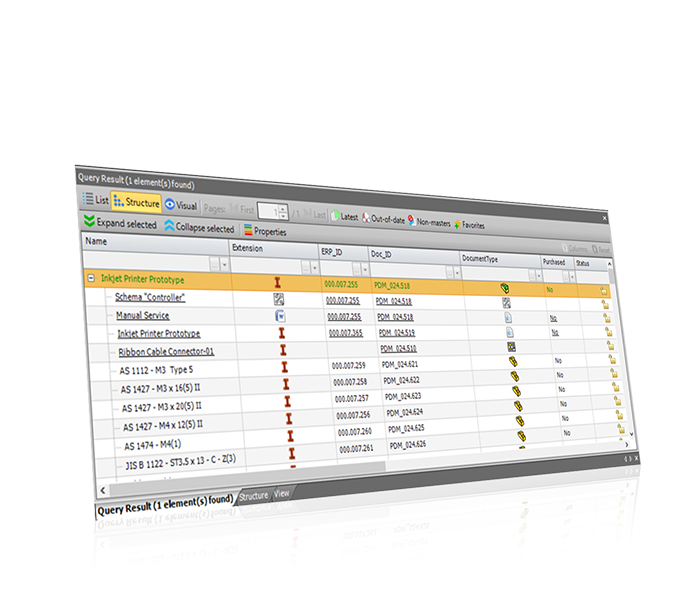
- Structure of the assembly and the connection between the 3D model and drawing
- Quick overview of assemblies without needing to open Inventor
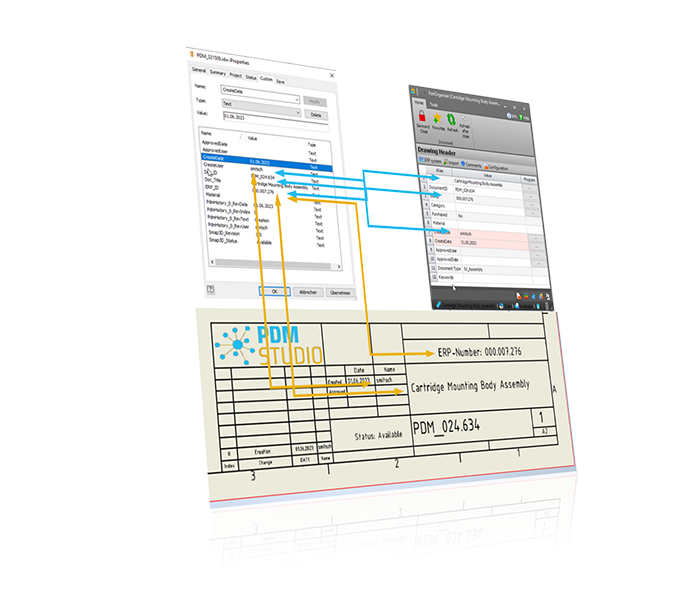
- Synchronization of file properties between Inventor and PDM Studio
- Use the information to fill in the title block in Inventor or to generate bill of materials (BOM) in Inventor.
- Additional documents can be added to the structure or to an individual document for better clarity. For example, a PDF containing specifications for a purchased part can be directly attached to the component.
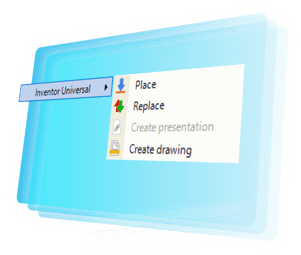
Inventor components can be used directly from PDM Studio:
- Place into the already opened assembly or drawing
- Create drawings
- Replace the selected model in the assembly

Check out our videos on the integration of PDM Studio with Inventor CAD:
The integration and implementation of PDM Studio can usually be completed in just a few weeks. Preparing data in advance is not necessary.
Existing data is transferred 1:1 from another PDM system or folder structure and is optimized during processing. It doesn’t get any faster or easier!
Interested in PDM Studio? Send us a message:
Smap3D GmbH
Am Marktplatz 7
93152 Nittendorf
Germany
Tel.: +49 9404 9639-10
E-mail: info@smap3d.com
Smap3D, LLC
260 Arbor Springs N Dr.
Newnan, GA30265
USA
Tel.: +1 408 484 6404
E-mail: info@smap3d.com